


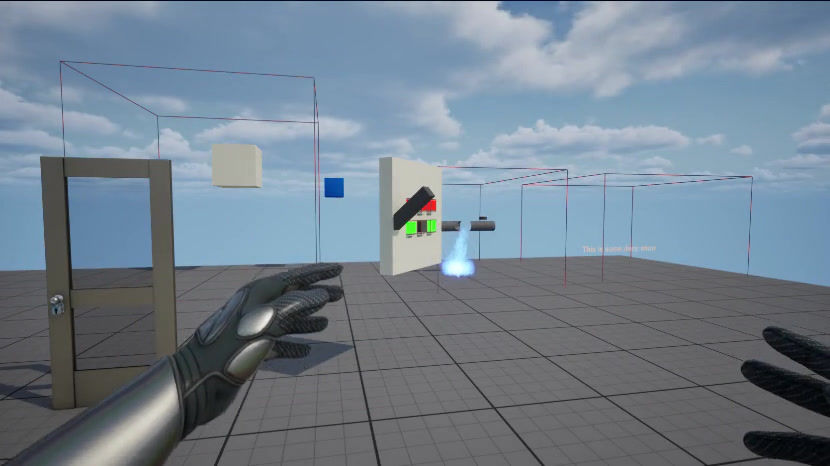
Padlock, Keycard and, Code lock Galore, oh and a fuse box
This sprint has been a plethora of various locks to doors. Apparently there's more than just one way to lock a door, who knew! I started with creating a system to allow for a level designer to easily change what type of door is being implemented rather than having multiple different versions of the same actor. To do this I first needed to create some Enums to assign to a door as well as a key object. I also needed to make sure the player knows what type of keys they have acquired. I also needed to do this without these keys going into the players inventory in case they decided to drop them off a cliff and soft lock themselves. To do this I decided to add a new page to the journal for collectables. Along with other cool trinkets throughout the level the player whenever picking up a key it will be stored in the journal. Using the same 3D renderer that has been used before so they can rotate and look at the model in different ways all inside their journal. Whenever a player interacts with a keycard or padlock door it will check their journal to see if they have acquired the necessary key, if not the door will remain locked. If they do have the correct key it will then permanently remain unlocked for them and function like a regular door. The only real difference between a padlock and a keylock door is the ability to shoot off a padlock using the pistol. However for current testing purposes and the fact the pistol is not finished yet you instead "kick" the padlock off the door. Finally along with the multiple door systems I created a fuse box puzzle. This puzzle is designed to distract the player while enemies get closer. In order to create this puzzle I needed to assign six slots that can be adjusted in the level. These slots are either defaulted to good or blown. Then there are fuses that are placed in each slot. These fuses each have a slot assigned to them to allow the level designer to make each fuse box different without the need of a new blueprint. If a fuse is in the correct slot and it is not blown it will remain green *the best programmer art* and if it is blown it will be red. All red fuses need to be take out by the player and discarded to the floor. Then any fuses that are free *not blown but the slot is unassigned* can be placed into any of the empty slots in order to complete the circuit. Then once all of this has been achieved the player can flip back on the fuse box power and finish the puzzle.